
Professional Chord Diagrams Without Writing Code: A Complete Practical Guide
Chord diagrams answer one question well: who flows to whom, and how much. This guide covers what they can and cannot do, how to read them correctly, then maps nine variants — classic, scallop, two-camp gradient, bubble, bipartite half-ring, dual-sector with axes, Circos collinearity, group flow and spectral thin-line — to the data structures they actually fit, with CSV schemas and a selection table.
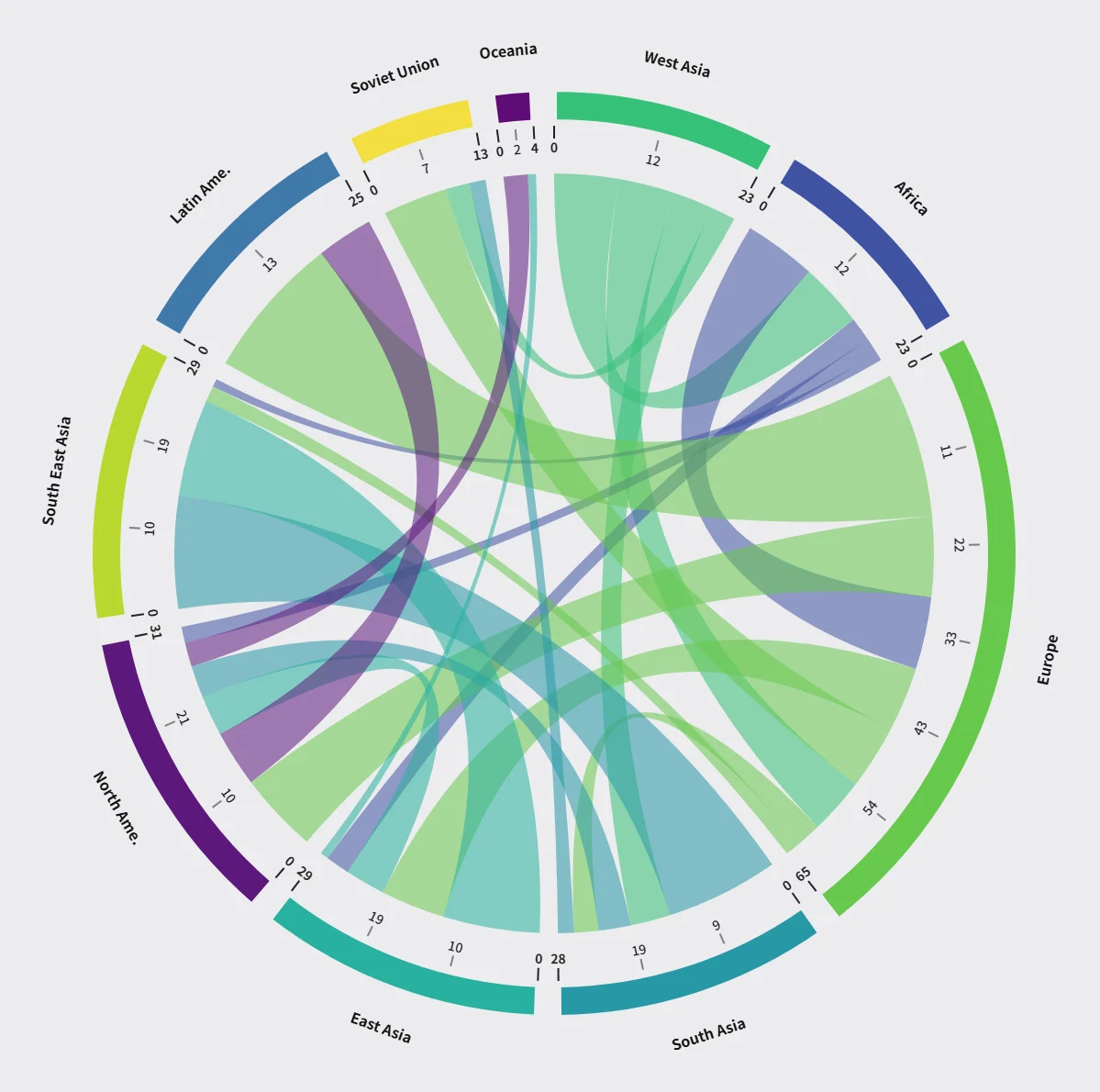
A chord diagram is not one of those charts that looks impressive but says nothing. It answers one specific question: who flows to whom, and how much. That question sounds simple, yet the wrong chart never answers it well — bar charts compare a single measure, line charts are built for change over time, and “category × category” relationships stay murky in both.
This guide comes in two parts. First, what chord diagrams can and cannot do, and how to read one correctly. Then, nine common variants mapped onto the data structures they actually fit. Every variant includes a real rendered chart and a CSV example you can copy and run.
1. What chord diagrams actually solve
When your data is a many-to-many relationship — trade between countries, collaboration frequency between departments, co-expression between genes — bar and line charts both fall short. The basic structure of a chord diagram is easy to describe: each category occupies an arc around a circle, arc length is proportional to that category’s total flow, and the connecting lines — the chords — encode pairwise magnitude as width.
In grammar-of-graphics terms it is a variant of the arc diagram: nodes are arranged radially around the circumference and linked by weighted arcs. That layout expresses a large number of relationships while keeping visual complexity down, instead of collapsing into the hairball you get from a force-directed or fully connected network graph.
It fits roughly these situations:
- Trade and migration: imports and exports between countries, movement between cities
- Social and diffusion: interaction strength between accounts, information spread paths
- Bioinformatics: gene co-expression, protein interactions, species interactions
- Organisational analysis: collaboration frequency between departments, ticket and approval flows
- Text co-occurrence: keyword co-occurrence networks, co-authorship maps
Its limits matter just as much. A chord diagram gives up precise comparison: reading a chord’s width, you cannot reliably tell 42 from 38 — a difference a bar chart shows instantly. So when your goal is comparing individual values, bars or dot plots serve you better. What a chord diagram does that nothing else does as well is make the overall structure visible at a glance: who is the hub, who sits at the edge, whether two camps are tightly or loosely linked.
There is also a hard ceiling. Past roughly 60 nodes and a few hundred relationships, every chord diagram starts to smudge. That is not a limitation of any particular tool — there is simply only so much usable area near the centre. The fourth and ninth variants below handle high density in different ways.
2. Learn to read one first
Two minutes spent on reading a chord diagram decides whether you pick the right template.
- Read arc length, not arc position. An arc’s length encodes only that node’s total. Where the circle starts, and whether it runs clockwise or counter-clockwise, carries no information — tools differ on this, and it does not change any conclusion.
- Read chord width. It encodes pairwise magnitude. Wide chords are strong relationships.
- Read chord colour. It usually answers “whose chord is this” — most implementations tint a chord with its source node’s colour, so a cluster of one colour tells you that node is a major exporter.
- Read the ticks and dividers inside arcs. Some variants draw numeric ticks rising from 0 along an arc: that is cumulative flow. Others draw thin white lines: those are the boundaries left after splitting the arc per relationship, and their count equals that node’s number of connections.
Put those four together and one chart yields three levels of conclusions: the global size distribution (arc length), local strong ties (chord width), and structural roles (colour clustering plus in-arc dividers).
3. Before you start: the three-column convention
Almost every online chord diagram tool consumes the same shape of data: a three-column CSV, with a source, a target and a value.
source,target,value
USA,China,580
USA,Germany,320
China,Germany,210
Japan,China,180
A few traps worth avoiding up front:
- The header row. The conventional form is
source,target,valueon the first line. Most tools recognise and skip it — but if your header reads “From,To,Count” in your own language, detection may fail and the chart gains a node literally named “From”. When in doubt, delete the header. - Encoding. Excel on many systems saves CSV in a legacy local encoding; a browser reading it as UTF-8 then turns non-ASCII labels into mojibake. Two fixes: re-save as UTF-8 from a plain text editor, or keep the CSV labels in plain ASCII and edit the text after export. Every example in this article uses ASCII labels so you can copy them and get a chart immediately.
- Values must be positive. Rows with zero or negative values are rejected as invalid input.
- Self-loops. A row where source equals target (
A,A,10) is ignored by most implementations, since it cannot draw a meaningful chord. - Two-way pairs. Whether
A→BandB→Aare merged varies: some tools draw two separate curves, others merge them into one and add the values. Check the tool’s note before you start, or you may double-count.
4. Nine variants, matched to your data structure
The nine variants below target different structures and different reading goals. Each comes with a real rendered chart (the data shown is that tool’s default sample) and a CSV example you can copy directly.
Variant 1: Classic circular chord — the most general starting point
Fits: three columns source,target,value with categories of equal standing. Country trade, call records and citation networks all belong here. If you are unsure which template to use, start with this one.
Data: three columns, up to 200 rows and 60 nodes.
Reading it: coloured outer arcs ring the circle, their length equal to each node’s total; a numeric scale inside each arc runs from 0 up to that node’s total; translucent ribbons cross the centre, wider meaning heavier flow.
Using it: drop in a CSV and the chart appears — the page ships with a multi-region flow sample, so there is something to look at immediately. Three colour themes, light and dark canvases, and dark mode adjusts ribbon opacity so the weave does not turn to mud on a dark background.
source,target,value
West Asia,Africa,8
Africa,Europe,9
East Asia,Europe,8
Europe,North Ame.,12
Latin Ame.,Europe,6Tool: online chord diagram generator
Variant 2: Scallop chord — when one side is ten times the other
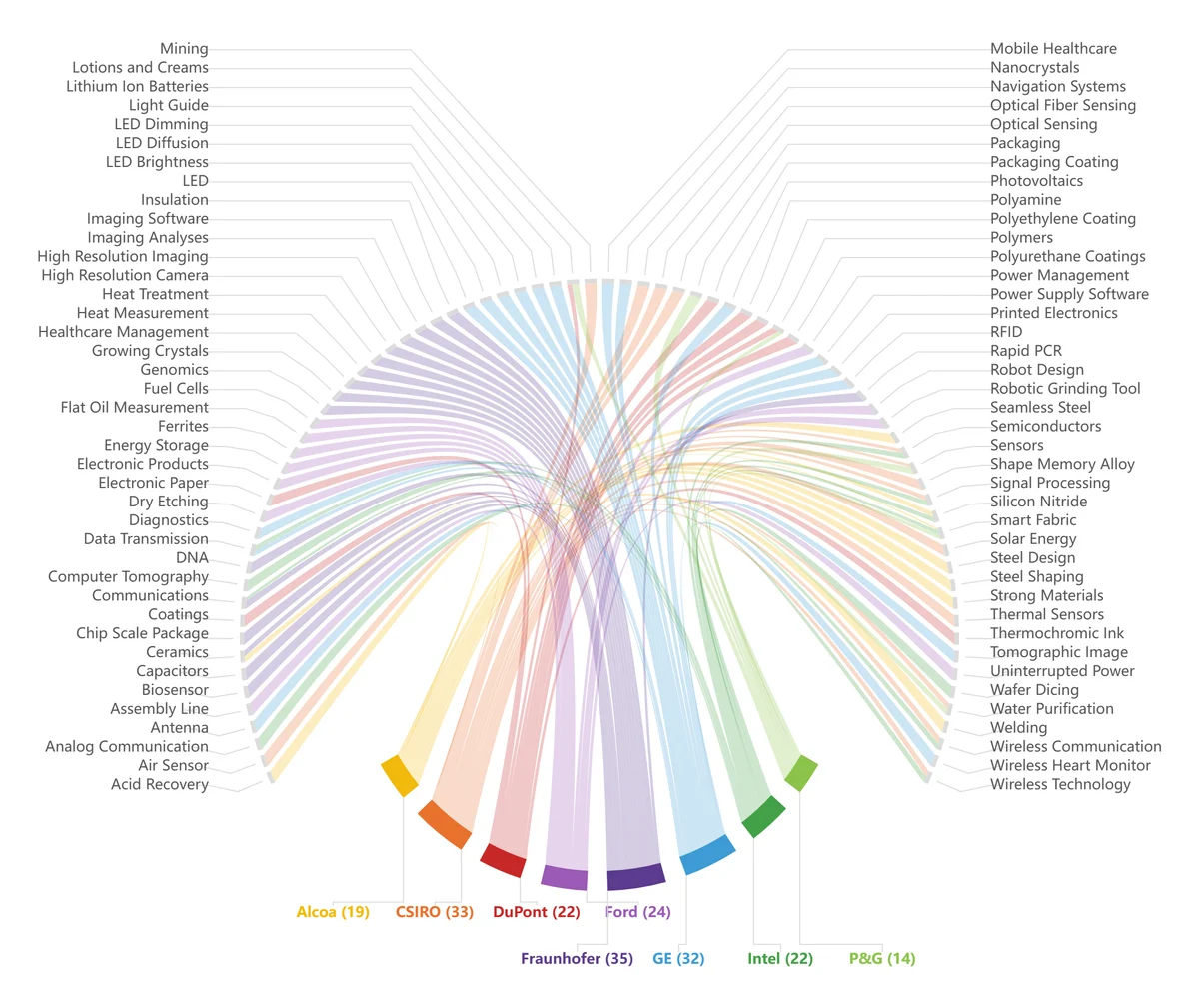
Fits: the classic bipartite citation shape, such as “8 companies → 78 technologies” or “a few institutions → a great many topic tags”. A standard chord diagram handles this badly: the small side gets absurdly long arcs and the large side’s labels pile into an unreadable stack.
Data: three columns source,target,value. source are the bottom groups (≤12), target the top nodes (≤120), up to 300 rows — a looser row limit than the other variants, precisely to accommodate few-to-many.
Reading it: the circle is cut into two sectors. Roughly a third of the circumference along the bottom holds the groups, weighted by flow and filled in strong colours; roughly two thirds along the top holds the many nodes at equal width, which is what keeps their labels legible. Thin ribbons bend around the centre to connect the two sides, forming the scalloped fan. Labels radiate outward and never tangle.
source,target,value
CompanyA,Patent-101,3
CompanyA,Patent-118,2
CompanyB,Patent-101,4
CompanyB,Patent-127,3
CompanyC,Patent-118,2Tool: scallop chord diagram generator
Variant 3: Two-camp gradient chord — when nodes fall into sides
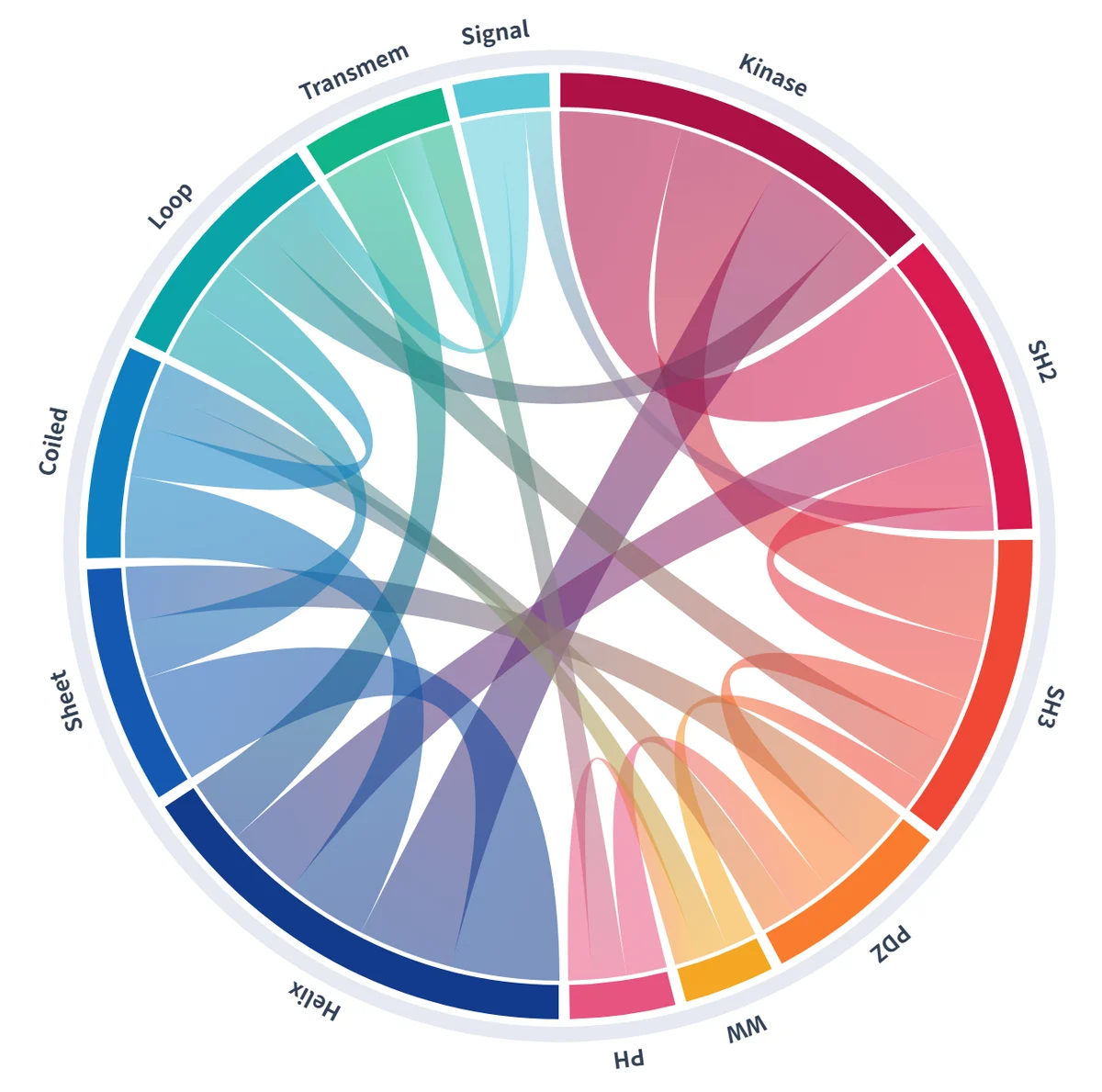
Fits: nodes that naturally split into two opposing or paired camps — upstream suppliers versus downstream customers, competitor A’s users versus competitor B’s, treatment versus control. A single-colour chord hides that split; this variant gathers each camp into a continuous arc and renders cross-camp links as ribbons that gradient from the warm end to the cold end, so the direction of flow is legible in the colour itself.
Data: source,target,value,group. The fourth column is optional — warm or cold assigns a camp, and leaving it out splits the nodes evenly. Up to 200 rows.
Reading it: a Circos-style layout rotates node labels with the circle and leaves the centre open for the classic ring aesthetic. Each link’s fill gradients from its source node’s colour to its target’s, with translucent layering giving the ribbons their body. Hovering fades everything unrelated so a single relationship stands out.
source,target,value,group
UpstreamA,DownstreamX,42,warm
UpstreamB,DownstreamY,31,cold
UpstreamA,DownstreamY,24,warm
UpstreamC,DownstreamX,18,coldTool: Circos gradient chord diagram generator
Variant 4: Bubble chord — when nodes carry their own metrics
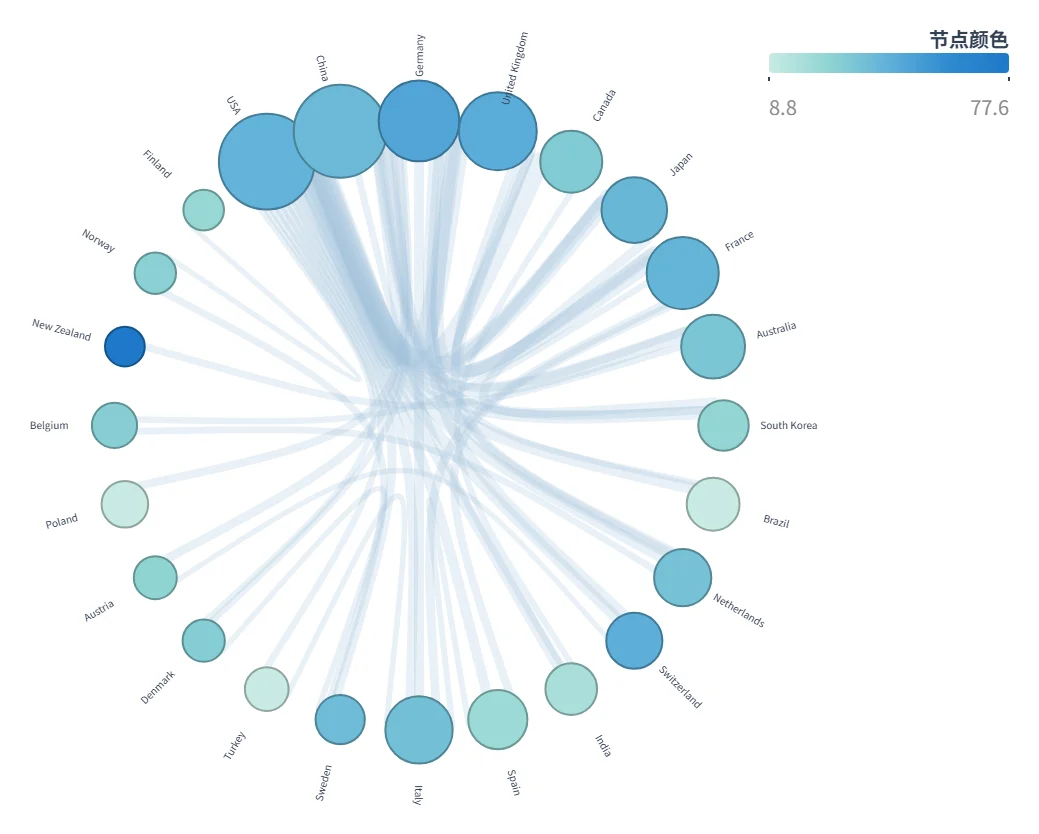
Fits: participants whose role is not only “who they connect to” but also how big and how good they are. Bibliometric collaboration networks are the textbook case: a country is both a collaboration node and the bearer of a publication count and an impact score. In supply chains, a supplier has both supply relationships and a capacity figure plus a quality rating.
Data: two CSV sections separated by one blank line. First the links, source,target,value (up to 120 rows); then node metrics, name,size,color — optional, and any node you omit falls back to its total flow.
Reading it: nodes become bubbles on the outside of the circle. Diameter carries the first metric (size), fill colour runs along a teal-to-blue ramp for the second (color), and chord thickness carries relationship strength (value). Because the circle itself encodes nothing, even 30 nodes can keep their labels radiating outward without collision.
source,target,value
USA,China,210
China,Germany,150
USA,Germany,95

name,size,color
USA,85,92
China,78,88
Germany,45,73Tool: bubble chord diagram generator
Variant 5: Two-tone half-ring bipartite chord — when direction must be explicit
Fits: sources and targets with genuinely different identities, where “who points at whom” has to be obvious. Threat modelling (attack surface → risk type), requirements traceability (requirement → test case) and capability mapping (capability → objective) are typical.
Data: source,target,value, with source and target names disjoint — a strictly bipartite relationship. Up to 120 rows.
Reading it: a horizontal diameter splits the circle into two half-rings. The top half holds every source node in one colour family; the bottom half holds every target in another, so the two roles are separable at a glance. Each relationship is a Bézier curve leaving the inner edge of a source sector, crossing the centre, and landing on a target sector, with a small arrowhead showing direction. Sector width is weighted by total flow, and labels follow the ring’s tangent.
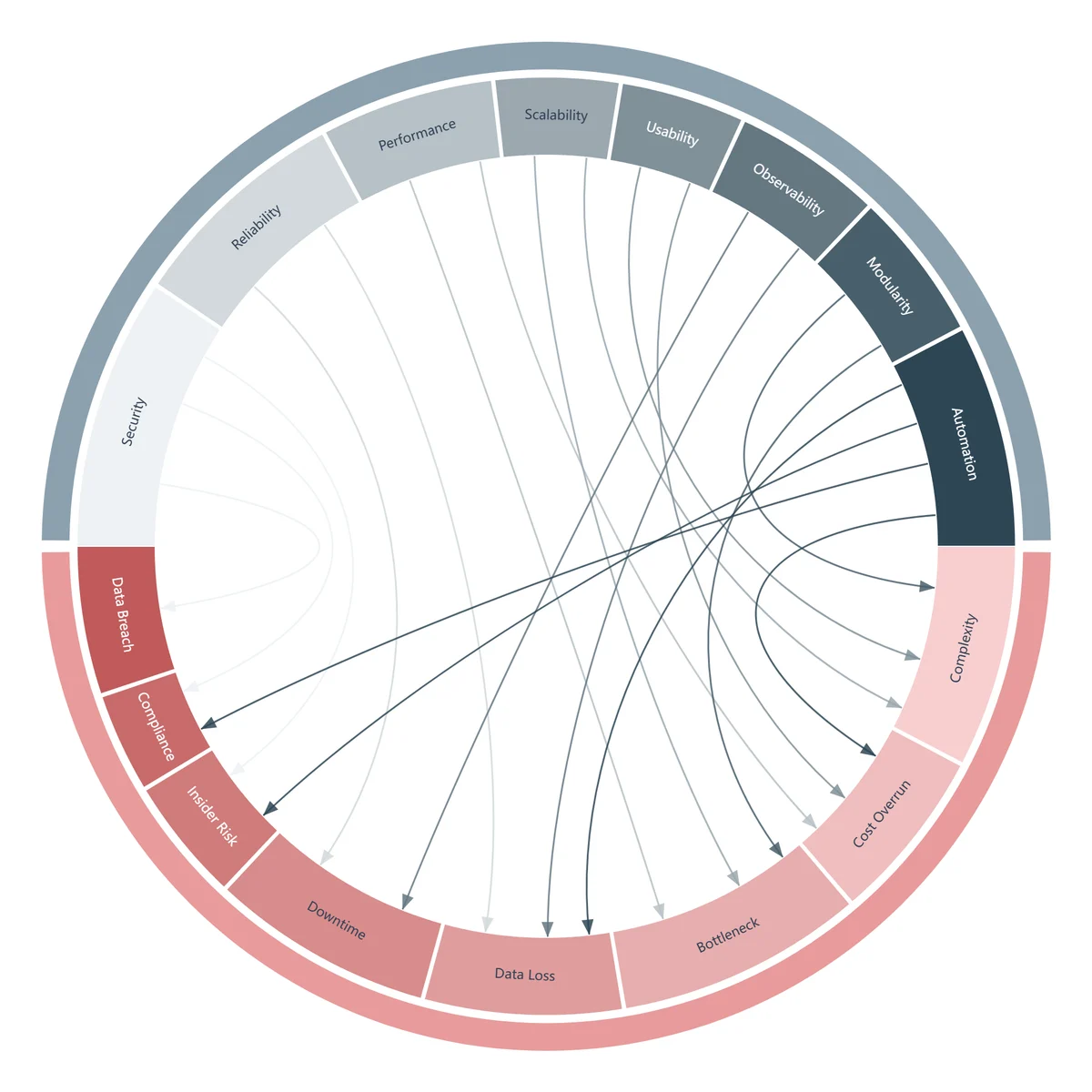
source,target,value
Security,Data Breach,6
Security,Account Takeover,4
Reliability,Downtime,5
Scalability,Bottleneck,3
Compliance,Fine,2Tool: two-tone half-ring chord generator
Variant 6: Dual-sector chord with axes — bipartite data you need to read off
Fits: bipartite relationships where you want actual numbers — channel movement, cost allocation, requirement coverage. The difference from variant 5 is that each sector here carries its own scale starting at 0, with major ticks every 10 units, so reading a value does not require guesswork.
Data: source,target,value, with disjoint source and target sets, up to 120 rows and 8 nodes per side.
Reading it: the outline resembles an hourglass. One sector at twelve o’clock holds the sources in saturated solid colours; another at six o’clock holds the targets in lighter tints of the same families, with openings left at the sides. Translucent coloured ribbons pass through the centre waist, and their density is the flow distribution.
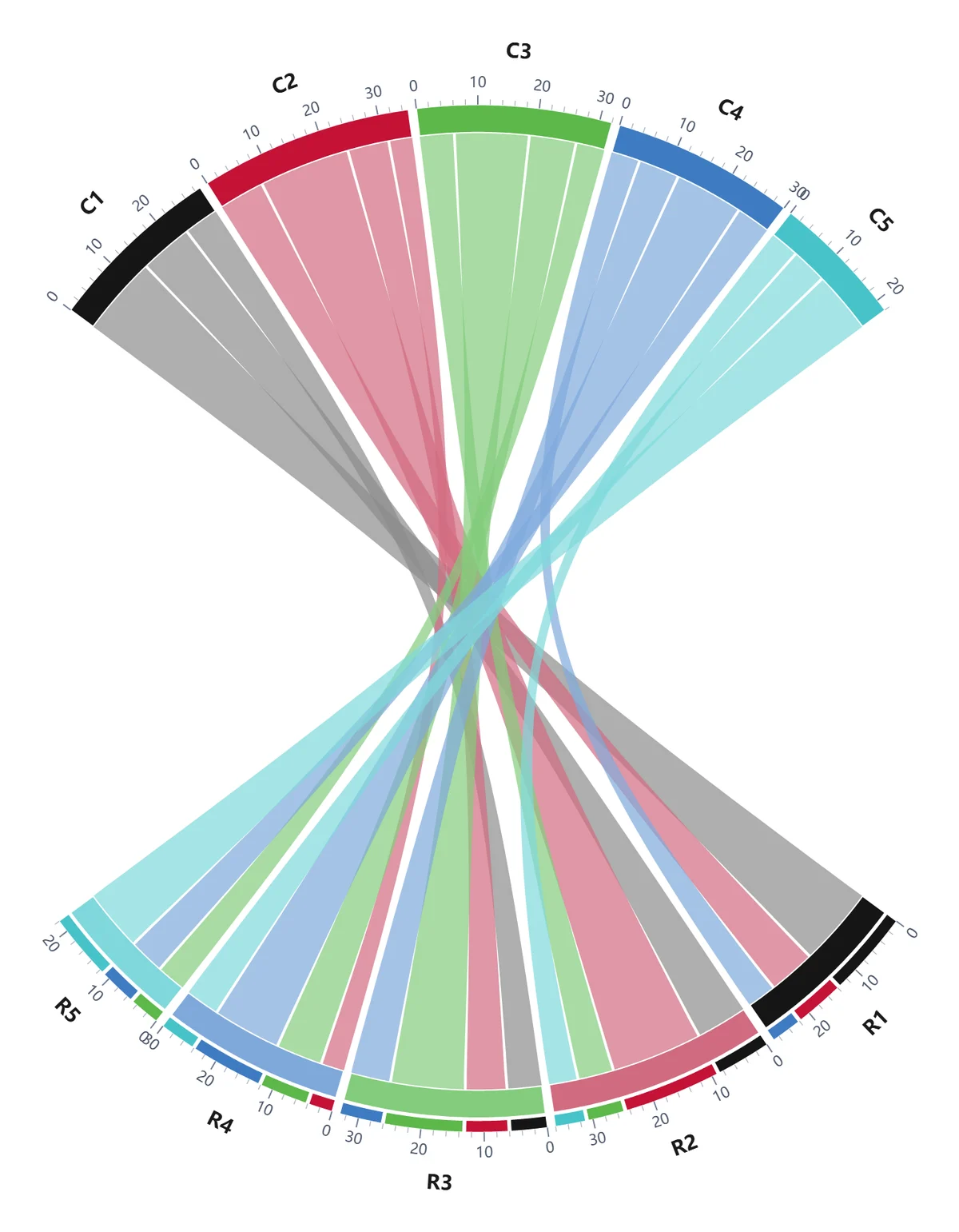
source,target,value
ChannelA,ProductLine1,45
ChannelA,ProductLine2,30
ChannelB,ProductLine1,22
ChannelB,ProductLine2,18
ChannelC,ProductLine1,12Tool: dual-sector colourful chord generator
Variant 7: Circos collinearity chord — when position beats magnitude
Fits: this is the one variant that does not treat nodes as discrete categories. It handles interval-to-interval mapping: genome collinearity (which stretch of chromosome corresponds to which), disk block migration (which blocks moved where), address range remapping, order batch reorganisation, stratigraphic depth comparison.
Data: a seven-column CSV — source_group, source_start, source_end, target_group, target_start, target_end, color, up to 240 rows. A row is not a weighted edge; it is one complete interval mapping.
Reading it: each stretch of the ring is not a discrete node but a continuous track, carrying coordinate ticks from 0. Thin curves in the middle map one interval on a source track onto an interval on a target track. The more they cross, the more the interval order has been permuted, reorganised or shuffled — and that is precisely the signal collinearity analysis is looking for.
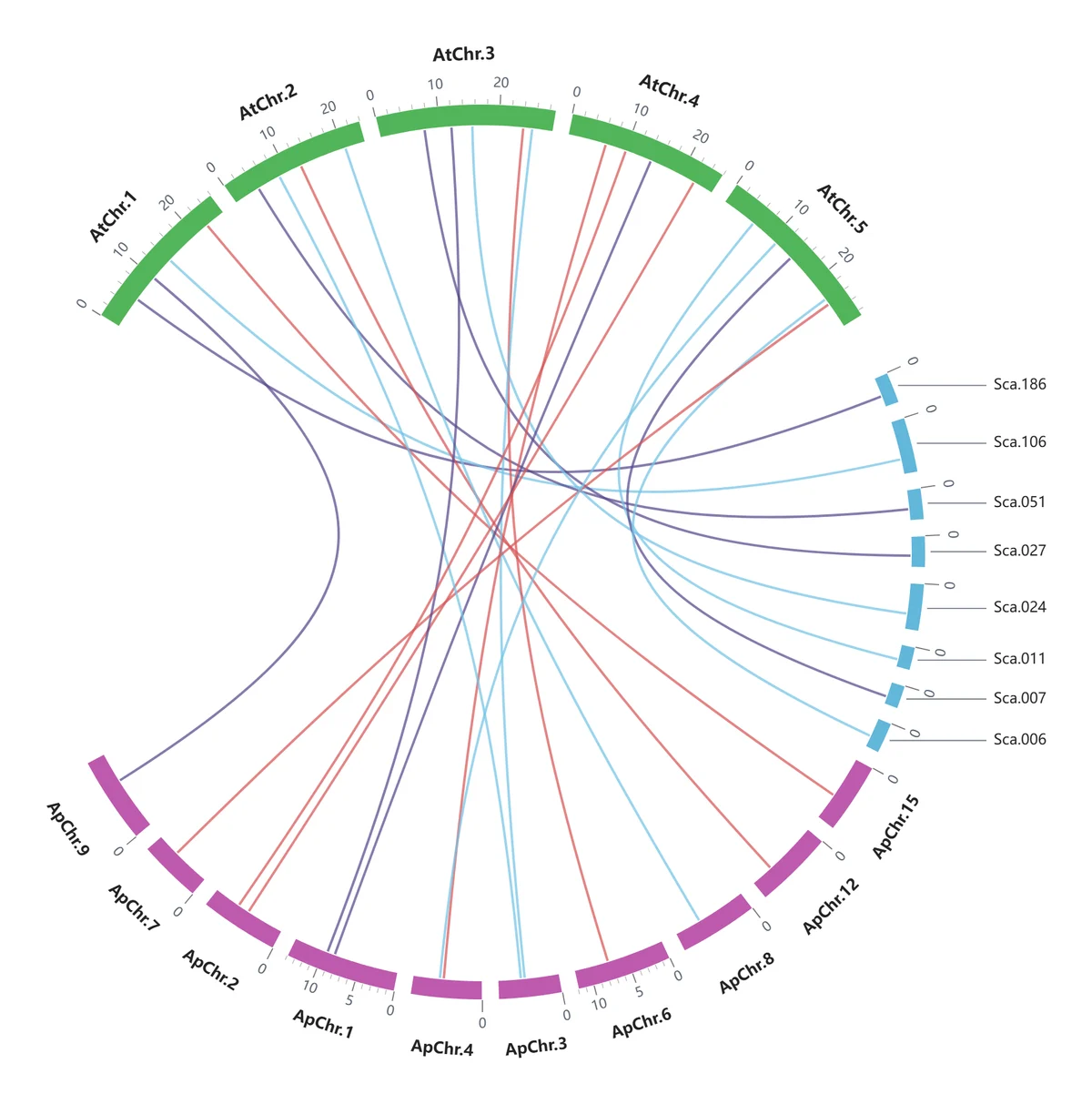
source_group,source_start,source_end,target_group,target_start,target_end,color
AtChr1,0,1500,Sca1,200,1800,blue
AtChr2,0,900,ApChr1,500,1400,orange
AtChr1,1500,2600,Sca2,0,1100,blueTool: Circos collinearity chord generator
Variant 8: Group flow chord — the many-into-few structure
Fits: sample classification, channel attribution, keyword-to-topic assignment, batch destinations. This data is naturally bipartite — one side numerous and small, the other few and large.
Data: source,target,value, with ≤24 sources and ≤12 groups, the two name sets disjoint, up to 200 rows.
Reading it: the ring splits into two half-circles. The left half holds the sources in one uniform colour; the right half holds the groups, one colour each, matched by a vertical legend. Inside every group arc, white dividers cut it into cells according to each source’s contribution — the number of cells is the number of sources that make up that group. To learn where group A’s contents come from, look inward along A’s arc: every ribbon pointing at it shares one colour, so the composition is immediate.
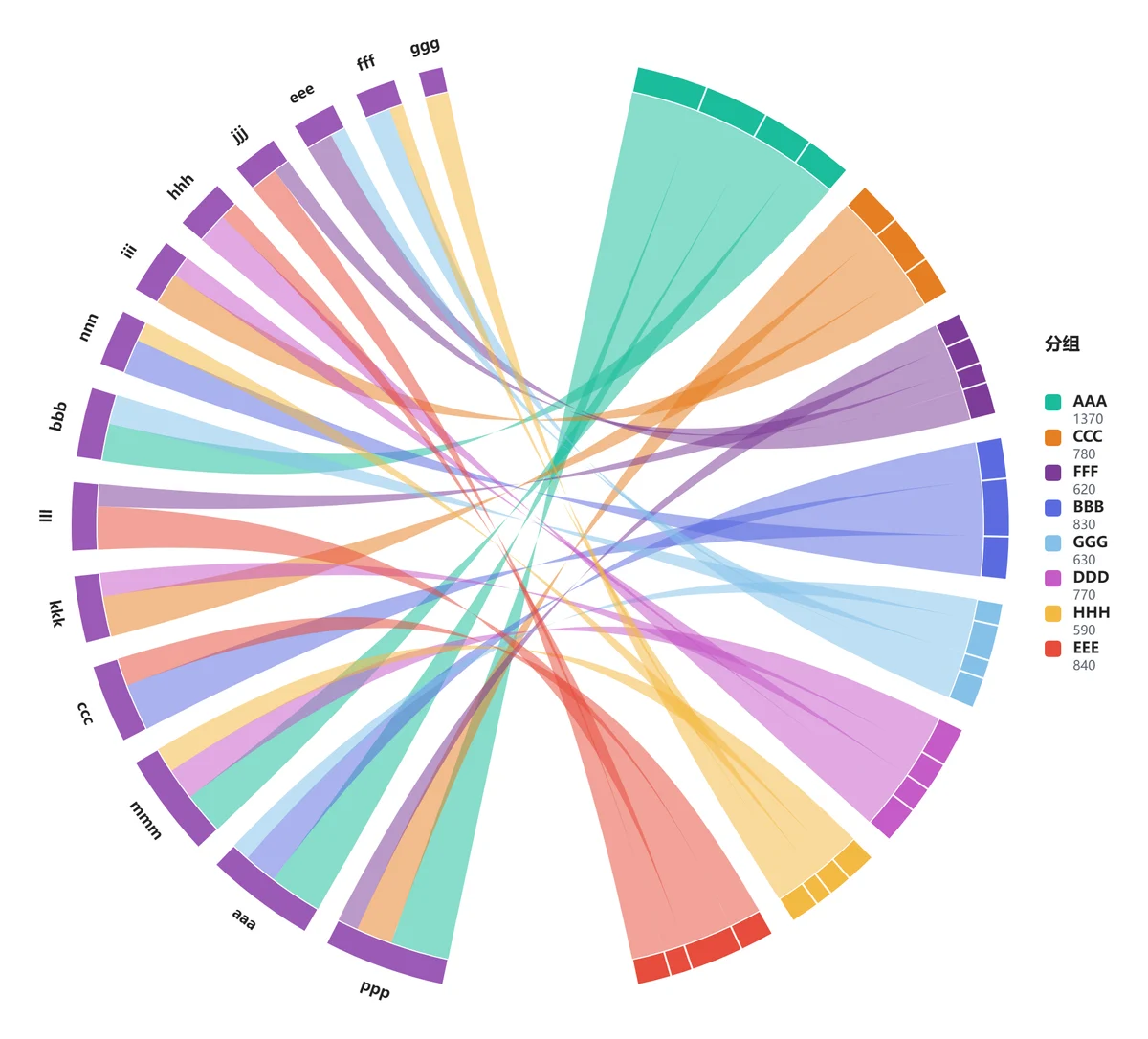
source,target,value
kw-A,Topic1,15
kw-B,Topic1,8
kw-C,Topic2,12
kw-D,Topic1,6
kw-E,Topic2,9Tool: group flow chord diagram generator
Variant 9: Spectral thin-line chord — a traceable network at high density
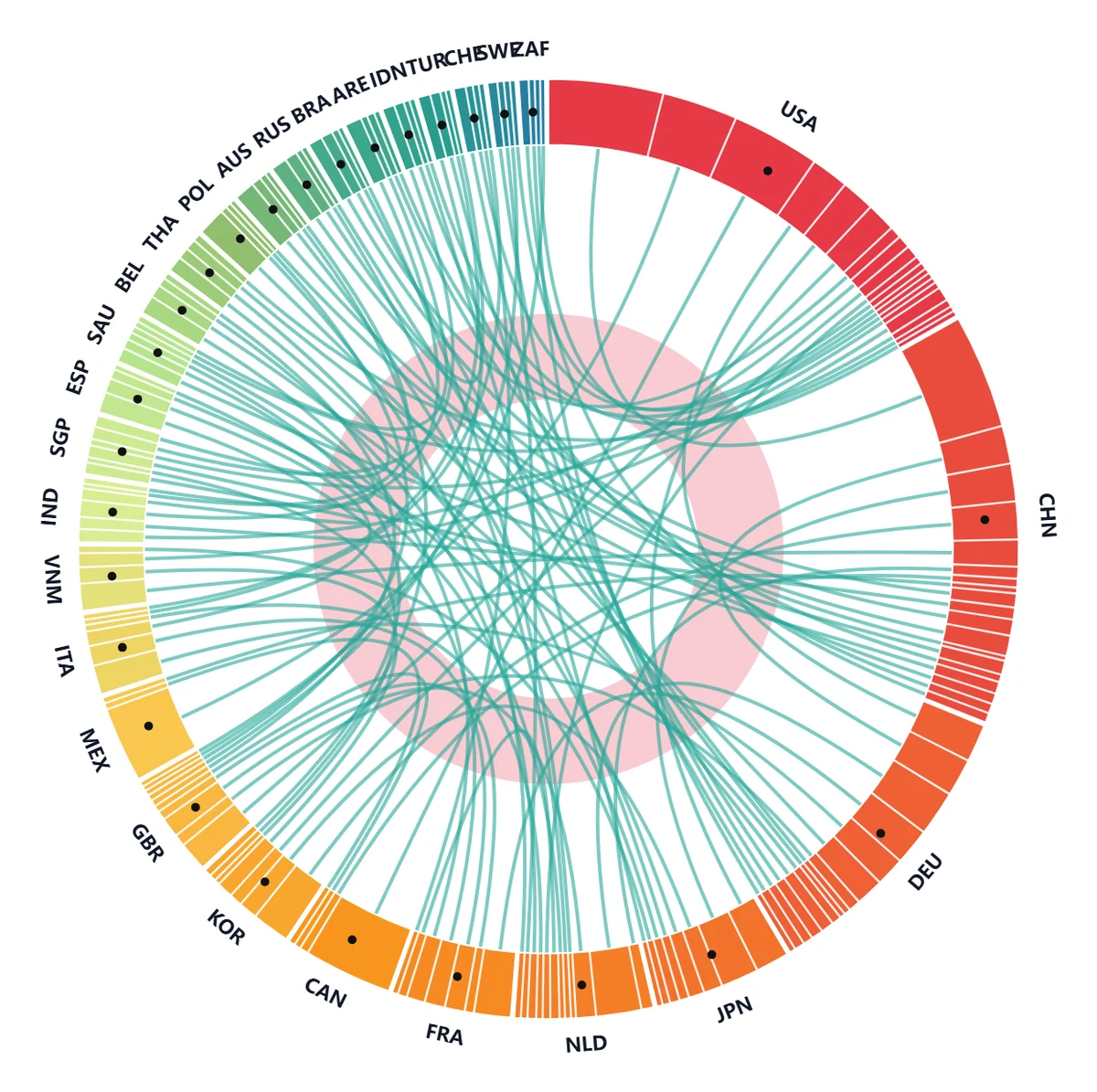
Fits: dense matrices with dozens of nodes and hundreds of relationships. A standard chord diagram’s wide ribbons cover each other into a solid block, and you cannot even follow one ribbon to both of its endpoints. This variant solves it with two decisions: colour is rank, and thin lines stay traceable.
Data: source,target,value, ≤60 nodes, up to 200 rows. A→B and B→A merge into a single two-way relationship with the values added.
Reading it: nodes are ordered clockwise by total, largest first, and arc colours are sampled along one continuous spectral ramp (red, orange, yellow, green, teal, blue). The reddest node is the largest, the bluest the smallest — hue itself is the ranking scale, so no legend is needed. Every relationship is a uniform thin line from the midpoint of one node’s arc segment to the other, bending toward the centre and crossing; at high density they weave a mesh you can actually follow. A translucent pink ring anchors the centre, and a small black dot marks each arc.
source,target,value
PaperA,PaperB,8
PaperA,PaperC,3
PaperB,PaperC,5
PaperC,PaperD,12
PaperA,PaperD,3Tool: spectral thin-line chord generator
5. Quick selection table
| Your data structure | Recommended variant | Why |
|---|---|---|
Plain source,target,value, peers on both sides | Variant 1, classic circular chord | No special structure; start from the defaults |
| One side tiny, the other huge | Variant 2, scallop chord | e.g. “8 companies → 78 technologies” |
| Nodes split into two camps | Variant 3, two-camp gradient chord | When the camp boundary needs to pop |
| Nodes carry scale or quality metrics | Variant 4, bubble chord | To read “who is strongly linked” and “who matters” at once |
| Distinct source and target roles, direction matters | Variant 5, two-tone half-ring chord | Threat modelling, requirements traceability |
| Bipartite data where you need to read values | Variant 6, dual-sector chord | Each sector carries its own graduated axis |
| Interval-to-interval mapping, not discrete nodes | Variant 7, Circos collinearity chord | Genomes, address remapping, batch reorganisation |
| Many sources into a few groups | Variant 8, group flow chord | Attribution, classification, topic assignment |
| Many nodes (>30) and many links (>80) | Variant 9, spectral thin-line chord | You need a traceable network, not a colour block |
The logic is judge the data structure first, then the visual goal. If your data is plain source,target,value with fewer than 20 categories, variant 1 is always the safe choice. Switch to a specialised variant only when the default template hits a wall — labels colliding, camps invisible, direction ambiguous, values unreadable.
6. Four details that make it look professional
- Pick the export format by destination. PNG at 2× suits slides, reports and social media; SVG is vector, which suits journal layout and later colour or type changes in Illustrator or Inkscape.
- Light and dark is a delivery question, not a taste question. A dark canvas reads better on a projector and in dark-themed reports; a light canvas is safer for print and the web. Re-export after switching — the preview and the export use the same palette, so what you see is what you get.
- Label density sets the readability ceiling. Past about 30 nodes, do not expect every name to stay legible. Either move to a variant with a built-in degradation strategy (variants 8 and 9) or reduce the node count.
- Export from the canvas, not with a screen grab. The built-in export writes only the chart; a system screenshot drags in interface chrome, browser zoom and compression artefacts.
All nine implementations mentioned above share one usage pattern: open the page, upload a CSV, toggle light or dark, export an image. Data is parsed and drawn in the browser, never uploaded to a server, and no account is required; exports carry no watermark.
7. Closing
The value of a chord diagram is making a complex many-to-many relationship readable at a glance. The real barrier is rarely the drawing — it is two judgements: which class of data structure you have, and what each visual channel on the chart actually means. Get those right and the rest is uploading a CSV.
The nine variants above cover the great majority of relationship data shapes. If none of them quite fits, that usually means the question calls for a bar chart or a network graph instead of a chord diagram — which is also worth learning early.