
Natal Chart Calculator
Use Natal Chart Calculator
All GotoKit tools run directly online, no download required.
Enter birth date, time, and coordinates to generate a natal chart quickly.
Natal Chart
Calculation Summary
Major Bodies
Note: This tool is for chart calculation and learning display only, not astrological advice.
About this tool
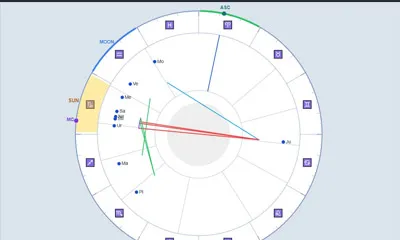
Generate a birth chart from date, time, and location, including the wheel chart, ASC and MC points, and major planetary positions.
- Calculated from real ephemeris data
- Multiple house and zodiac systems supported
- Results are for entertainment only
- Free to use, no sign-up
Compared with general astrology apps
| Aspect | This tool | Typical alternative |
|---|---|---|
| Usage pattern | One-off calculation and fast verification | More focused on content feeds and subscriptions |
| Learning path | Result first, explanation second | Information is often more spread out |
| Privacy | Better for fast input and immediate viewing | Often tied to accounts and profile history |
Docs
If you need more than a Sun-sign shortcut, this natal chart calculator provides a far more usable technical foundation. It turns birth date, birth time, location coordinates, zodiac model, and house system into a chart you can study, compare, and export from one page.
That matters because chart work is often comparative. You may want one baseline calculation, then a second pass under a different zodiac or house system. This tool is built for that workflow rather than for one-click horoscope simplification.
Interface Guide
- Birth date and birth time: These are the most important precision inputs. More accurate time generally means a more reliable chart structure.
- Latitude and longitude: Required for geographic positioning, especially for house calculation and angular points such as the Ascendant.
- Zodiac selector: Lets you switch between tropical and sidereal reference models for direct comparison.
- House system selector: Provides multiple house frameworks so users can review how interpretation structure changes by method.
- Generate Chart: Runs the active configuration and updates the chart plus supporting data.
- Download: Exports the current chart view for saving, sharing, or client preparation.
- Reset: Clears the inputs so a different chart can be built cleanly.
- Chart panel: Displays the circular natal chart, which is the primary structural output of the page.
- Summary block: Highlights ASC, MC, Sun, and Moon for fast orientation.
- Major bodies list: Shows the main planetary placements, houses, and retrograde state for deeper manual reading.
Best-Fit Use Cases
- Building and reviewing a personal birth chart with technical accuracy.
- Comparing zodiac or house systems against the same birth data.
- Preparing chart visuals for teaching, consultation intake, or content publishing.
Practical Note
This tool calculates and visualizes. It does not provide individualized fate claims. If birth time or coordinates are uncertain, angular points and house placement can shift materially, so source accuracy matters.
Last verified: 2026-04-15
Source: 0xStarcat/CircularNatalHoroscopeJS
FAQ
Is it free?
Yes, completely free. No signup, no limits.
What info needed?
Birth date, exact time, and coordinates (lat/lng).
Will birth info be saved?
No. All local. Never uploaded.
Which zodiac system?
Tropical and Sidereal. Switchable in the UI.
For beginners?
Yes. Auto-calculates ASC, MC, sun, moon, planets, and house info.
Is this astrology tool suitable for beginners?
Yes. The page is designed to show the main result first and the deeper astrological detail second. If you are new, start with the summary, then move into houses, aspects, or zodiac systems step by step.
Will my birth data or chart data be stored?
The default pattern is front-end or session-side calculation only, which is better for privacy-sensitive data. If a tool keeps local history or has an AI quota, that is described explicitly on the page.
How is this different from a general astrology app?
These web tools focus more on transparent one-off calculations and fast verification of charts, compatibility, or horoscope outputs. General astrology apps often focus more on push content, community, and subscription workflows.
Do I need to sign up, download, or install anything?
Most Gotokit tools are designed to open directly in the browser without a separate install. If a tool has a quota, browser requirement, or third-party dependency, the page copy will state that clearly.
More from Astrology
All Astrology toolsNumerology Calculator
Free Pythagorean numerology calculator. Enter your name and birth date to get your Life Path, Destiny, Soul Urge, Personality and Personal Year numbers.
Synastry Compatibility Calculator
Compare two birth charts with compatibility scores, dual-chart views, and radar-style relationship insights.
AI Daily Horoscope
Generate a daily horoscope from natal chart data, with uplifting guidance across general, career, and relationship themes.