
Artistic QR Code Generator
Use Artistic QR Code Generator
All GotoKit tools run directly online, no download required.
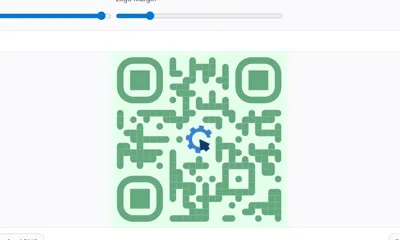
Artistic QR generator powered by qr-code-styling with logo, gradients, rounded dots, and styled corners.
About this tool
Design branded QR codes with custom dots, corners, logos, colors, transparent backgrounds, and PNG or SVG export.
- 100% free with no usage limits
- No sign-up or login required
- Runs right in your browser
- Privacy-friendly and fast to use
Docs
Design branded QR codes with custom dots, corners, logos, colors, transparent backgrounds, and PNG or SVG export.
Key Features
- Real-time content editing for URLs, text, and campaign messages
- Multiple dot styles (rounded, dots, classy, extra-rounded, etc.)
- Independent styling for corner squares and corner dots
- Center logo upload with adjustable logo size and margin
- Foreground/background color controls and transparent background
- PNG and SVG export for both marketing and design workflows
How to Use
- Enter your QR content (full URL is recommended).
- Choose size and error correction level.
- Tune dot style, corner styles, and color palette.
- Upload a center logo if needed and adjust logo ratio.
- Download as PNG or SVG after preview confirmation.
Typical Use Cases
- Event registration posters and booth materials
- Social campaigns requiring visual consistency
- Store standee QR cards with branded logo in center
- Design team handoff with editable SVG output
Notes
The generator runs locally in your browser. Styling and logo overlays may reduce scan reliability, so test the final code on multiple devices before publishing.
Last verified: 2026-04-17
Source reference: kozakdenys/qr-code-styling
FAQ
Is it free?
Yes, completely free. No signup, no limits.
Difference from normal QR?
Custom dot shapes, corner styles, logo, colors; more visually appealing.
Can I add a logo?
Yes. Upload PNG as center logo; adjustable size/margin.
Will data be uploaded?
No. QR generated locally; never uploaded.
What export formats?
High-res PNG and editable SVG.
More from Media
All Media toolsFree M3U8 Online Player - One-Click Instant Streaming
Play M3U8 and HLS streams in your browser with quality switching, playlist inspection, and quick testing tools for both live and on-demand video.
QR Code Generator
Generate clean QR codes from text or URLs with size, color, corner radius, and error-correction controls.
Random Lottery Picker
Run a browser-based prize draw with custom prizes, participant lists, winner counts, local history, and exportable results.
Rolling Number Lottery
Create animated three-digit number draws with acceleration and staged slowdown for live events, raffles, and big-screen reveals.
Spin the Wheel Random Picker
Free online spinning wheel for giveaways and random picks. Custom entries, fullscreen mode, Morandi colors, sound effects, shareable links. No sign-up.