
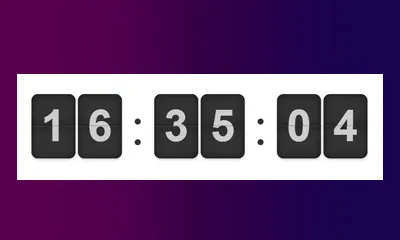
3D Flip Clock
Use 3D Flip Clock
All GotoKit tools run directly online, no download required.
Stunning 3D flip clock powered by FlipClock.js. Clock, stopwatch, and countdown modes.
About this tool
Display a polished 3D flip clock, stopwatch, or countdown timer for streams, events, dashboards, kiosks, and large-screen displays.
- Accurate timing that keeps running in the background
- No install, opens instantly
- Fullscreen mode for projectors and classrooms
- Free and unlimited, no sign-up
Compared with native timer apps
| Aspect | This tool | Native timer app |
|---|---|---|
| Startup | Great for instant launch | Better for always-on use |
| Projection and classes | Fullscreen display is very direct | Stronger notifications, not always better display |
| Background behavior | Depends on browser behavior | Usually stronger for long background sessions |
Docs
Display a polished 3D flip clock, stopwatch, or countdown timer for streams, events, dashboards, kiosks, and large-screen displays.
Unlike static digital clocks, this tool uses CSS 3D flip animations to deliver a visually striking experience whenever digits change.
Core Features
- Three modes: Clock (live time), Stopwatch (elapsed time), Countdown (target time)
- 3D flip animation: Smooth CSS perspective flip on every digit change
- Dark/light theme: One-click theme toggle for night-mode displays
- Fullscreen mode: Enter immersive fullscreen display
- Zoom control: 4 zoom levels for different screen sizes
- Responsive: Works smoothly on desktop and mobile
How To Use
- Choose a mode: Clock / Stopwatch / Countdown
- Clock mode: Shows real-time automatically, flips every second
- Stopwatch mode: Tap “Start” to begin, “Reset” to zero
- Countdown mode: Enter hours/min/sec, tap “Start”, stops at zero automatically
- Use top-right buttons to zoom, toggle theme, or enter fullscreen
Typical Scenarios
- Website or event page header clock decoration
- Countdown pages for product launches, promotions
- Data visualization dashboards and exhibition screens
- Live stream OBS overlay clock
- Meeting or presentation timer
Notes
- Countdown precision is second-level; suitable for display, not precision timing
- Fullscreen may be limited on some mobile browsers
- Stopwatch and countdown reset on page refresh
Last verified: 2026-05-10 Source: objectivehtml/FlipClock
FAQ
Is it free?
Yes, completely free. No signup, no limits.
What modes?
3 modes: clock (current time), stopwatch (ms), countdown.
Stopwatch shows ms?
Yes. Shows mm:ss + milliseconds (.000) with flip animation.
Does it consume resources?
No. Performance-optimized with on-demand rendering.
Use for streaming?
Very suitable. 16:9 canvas for large screens and OBS overlays.
Is this timer suitable for classrooms, meetings, or study sessions?
Yes. Classrooms and meetings benefit from fullscreen visibility, while study sessions benefit from stability, quiet operation, and longer runtimes. Pick the display style and alert mode that fits the room.
Will the timer keep running if I switch tabs?
Usually yes, but exact background behavior can depend on the browser and its tab-throttling rules. For important use cases, test your setup first and keep the page open during the session.
How is this different from a dedicated timer app?
The web version is better for quick start, cross-device access, and projector use, while a native timer app is usually better for system notifications, offline integration, and very long background sessions.
Do I need to sign up, download, or install anything?
Most Gotokit tools are designed to open directly in the browser without a separate install. If a tool has a quota, browser requirement, or third-party dependency, the page copy will state that clearly.