
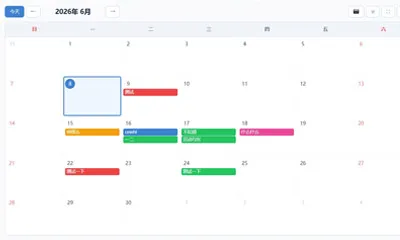
Schedule Calendar
Use Schedule Calendar
All GotoKit tools run directly online, no download required.
A local-first online schedule manager. View, add, and edit calendar events by month with tag categorization and filtering. All data stored in your browser--no signup needed.
About this tool
Manage events in a local-first monthly calendar with seven tags, image export, fullscreen mode, favorites, and share links.
- 100% free with no usage limits
- No sign-up or login required
- Runs right in your browser
- Privacy-friendly and fast to use
Docs
Manage events in a local-first monthly calendar with seven tags, image export, fullscreen mode, favorites, and share links.
Features
- Monthly Calendar : Month-by-month navigation, grid view with colored event indicators
- Tags/Labels : 7 distinct colored tags, one-click filtering
- Event Management : Add/Edit/Delete events with title, time, and tag
- Pure Local : All data in localStorage, zero network transfer
- Today / Navigation : Quick jump to current day, prev/next month
- Fullscreen Button : Enter fullscreen mode for expanded viewing
- Favorite Button : Star-mark for quick access from the tool list
- Share Button : Quick copy page link to clipboard
Usage
- The current month and today’s date are displayed by default.
- Click any date to view/add events in the bottom panel.
- Click “Add”, enter title, time, and select a tag, then save.
- Click a tag in the filter bar to view only matching events.
- Use the top-right buttons for fullscreen, favorite, or share.
Scenarios
- Personal Management : Schedule daily study, sports, and travel
- Team Management : Create separate calendars with tags for team projects
- Project Tracking : Tag project milestones and track progress
- Family Planning : Manage family appointments, activities, and memos
Notes
- All data in browser localStorage; clearing browser cache will erase it.
- Weekend highlighting with distinct color coding.
- Events stored as JSON, easy to export and import.
- Built from scratch for Gotokit integration.
Last verified: 2026-06-06 Reference: bosens-china/calendar
FAQ
Is this tool free?
Completely free. No signup, unlimited use.
Where is data stored?
All in browser localStorage. No server upload. Clearing cache will erase data.
What tags are available?
7 built-in tags: Work, Study, Sport, Fitness, Meeting, Personal, Travel. Each with distinct colors.
What do the top-right buttons do?
Camera downloads calendar as PNG image with watermark; Fullscreen expands; Favorite bookmarks; Share copies link.
Can data be exported?
Data is stored as JSON in localStorage. You can copy it from browser DevTools for backup.