
Three-Column Influence Sankey Diagram Generator
Use Three-Column Influence Sankey Diagram Generator
All GotoKit tools run directly online, no download required.
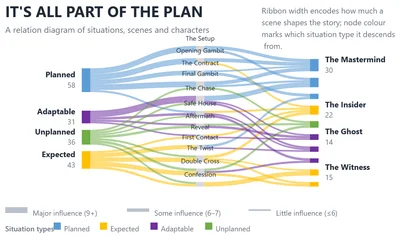
Upload a fixed CSV template to generate a three-column influence-flow Sankey — situation type → scene → character. Ribbon width is influence level, colours follow the classic office theme (blue / yellow / purple / green / orange), and the legend auto-reads your own node names. Light / dark canvas with PNG / SVG export.
About this tool
Most Sankey charts stop at two columns and can only answer "A flowed into B". This one adds a middle layer, chaining which kind of situation, through which scene, ultimately shaped whom — a traceable causal path with band width strictly equal to value, so the thickest ribbon is the storyline. Right-column characters inherit the colour of their largest source, so same-coloured characters share a situation type, and the bottom legend carries no fixed copy — it reads your own CSV category names, turning instantly into a bespoke chart.
- Export crisp PNG / SVG you can keep editing
- Multiple built-in themes, one-click switch
- Light and dark canvas support
- Free, no watermark, no limits
Compared with general charting workflows
| Aspect | This tool | Typical alternative |
|---|---|---|
| Visual direction | Optimized for a specific chart grammar | More general, but more setup |
| Export | Fast PNG/SVG export first | More formats, but heavier workflow |
| Best fit | Slides, landing pages, and social visuals | Building bespoke analytical charts from scratch |
Docs
What is a Three-Column Influence Sankey Diagram?
A three-column influence Sankey diagram is a relationship chart in which ribbon width encodes how much something matters. Data is organised into three columns: the left column holds situation types (planned, expected, adaptable, unplanned), the middle column holds concrete scenes, and the right column holds characters or outcomes. Band width between columns is strictly proportional to value, so a thicker ribbon means that scene carries more weight along that storyline. Unlike a plain two-column Sankey, the three-column structure chains cause → process → outcome into one traceable path and stays naturally conserved — all three columns sum to the same total.
The layout became popular through film-style “plan / scene / character” relationship posters, where a viewer can follow the thickest ribbon to see which kind of situation, through which scene, ultimately shaped which character. It works just as well for serious analysis: any dataset that needs to answer “which kind of cause, through which path, produced what result” fits this structure.
Features
- Three-column semantic structure: situation type → scene → character, walking cause, process and outcome in a single traceable chain — one more layer of traceability than a two-column Sankey
- Ribbon width equals influence: band width is strictly proportional to value, and flows are automatically split into major / some / little influence tiers with the matching value ranges printed in the legend
- Colours inherit automatically: left-column categories use the classic office theme (blue / yellow / purple / green / orange), while each right-column node inherits the source category with the largest flow into it — colour immediately reveals provenance
- Legend reads your data: the bottom legend contains no fixed copy; it pulls the category names and colours straight from your CSV, so it updates the moment you swap in your own data
- In-chart title and caption: customise the in-chart title, subtitle and a top-right caption paragraph, so the export drops straight into a report
- Light / dark modes: one-click background switch for slides, white papers and web pages
- Multiple export formats: high-resolution PNG (2x pixel ratio) and vector SVG
- Privacy-first: all data is parsed and rendered locally in your browser, never uploaded to any server
Use Cases
- Screenplay and story-structure analysis: situation type → key scene → character, revealing which turns actually shaped a character
- Project retrospectives: risk category → affected stage → delivery outcome, pinpointing which risk class did the most damage and through which path
- User journey and conversion analysis: user segment → key touchpoint → conversion outcome, showing where each group drops off or converts
- Incident and failure attribution: trigger class → propagation path → impacted system, locking onto the causal chain with the largest blast radius
- Policy and decision rehearsal: preset scenario → triggering event → stakeholder response, for scenario planning and briefings
- Teaching and knowledge mapping: turn causal, propagation or dependency chains into a flow chart that shows relative weight at a glance
How to Use
- Click “Download CSV template” to get the sample file
- Fill in your data following the format:
category,scene,character,value - Click the upload area or drag & drop your CSV file onto the page
- The three-column Sankey diagram is generated automatically; toggle light / dark mode to preview
- Optionally edit the in-chart title, subtitle and caption in the input fields below
- Click “Download PNG” or “Download SVG” to save your chart
Data Format
| Field | Required | Description |
|---|---|---|
| category | Yes | First-column node name (situation type); 4–8 recommended |
| scene | Yes | Second-column node name (scene / stage); repeat a name to merge several sources into it |
| character | Yes | Third-column node name (character / outcome) |
| value | Yes | Influence weight of this path (positive number), which sets the ribbon width |
Limits: up to 60 data rows; at most 8 situation types and 30 scenes / characters each. Left-column order follows first appearance in the CSV, so you can keep the category you care about at the top.
How to read this chart
Read the three stages left to right: how much each situation type sends out, which scenes aggregate the most flow, and which characters those scenes hand influence to. A right-column node’s colour is inherited from its largest source category, so characters sharing a colour come from the same situation type. Hover any ribbon to read exact values.
About Gotokit
Gotokit is dedicated to providing simple, efficient and beautiful online tools. This three-column influence Sankey diagram generator is powered by the ECharts rendering engine — no sign-up required, ready to use out of the box, with all data processed locally to protect your privacy.
FAQ
How many CSV columns do I need? Where does the middle layer come from?
Four fixed columns: category,scene,character,value. Each row is one complete "situation type → scene → character" path; the tool automatically splits every row into a situation → scene band and a scene → character band, so you never fill the middle column yourself. A scene repeated across rows is aggregated automatically — that merging is exactly the extra insight a three-column layout gives you over a two-column Sankey. Up to 60 rows, at most 8 situation types and 30 scenes / characters.
On what rule are the right-column node colours assigned?
They are inherited automatically. The tool sums, for each character, the flow coming from every situation type, picks the largest one and assigns that category’s colour — so you can see at a glance which situation dominates each character. Left-column colours are handed out in the classic office theme order (blue / yellow / purple / green / orange…), so the right column only ever reuses the same palette and the whole chart stays harmonious.
How do ribbon widths relate to the thick / medium / thin legend at the bottom?
The legend is a data-driven auto-tiering, not a fixed scale. The tool reads the min and max value in your current dataset, splits the range into three equal tiers (major / some / little influence) and prints the real value range of each tier next to its sample line — so a new dataset immediately produces new legend ranges. The ribbons themselves are always strictly proportional to value, so the two confirm each other.
Is this chart tool better for slides, reports, or social visuals?
All three can work, but each needs a different emphasis. Slides care about legibility, reports care about structure and annotation, and social visuals care about density and style. Tune colors, labels, and export size for the destination.
When should I export PNG instead of SVG?
PNG is usually better for slides, chats, or social sharing, while SVG is better if you need to keep editing, scale for print, or embed the graphic in a design system. If the target platform does not support SVG, export a higher-resolution PNG.
How is this different from a general charting tool?
These tools are optimized for a specific visual grammar, so you can get to a strong result faster. General charting tools are more flexible across many chart families, but usually take more setup and styling work.
Can I use this tool on mobile phones or tablets?
Most tools work in modern mobile browsers, but complex charts, larger files, and precision drag-and-drop tasks usually feel better on desktop. If speed and control matter, desktop is the safer choice.
Is this tool better for one-off tasks or recurring workflows?
It is strongest for fast one-off tasks, quick verification, and temporary exports. If you need long-term automation, team collaboration, or deeper integration, you will usually pair it with desktop software, scripts, or a larger system.
More from Design
All Design toolsCircular Evidence Network Plot Generator
Generate a circular evidence network from independently entered patient totals and pairwise study counts in CSV. Node area shows patients and curve width shows studies, with local processing, light/dark mode and PNG/SVG export. No statistical analysis.
Pantone Color Picker
Pick any color and find the nearest Pantone reference instantly, with ready-to-copy HEX and RGB values for design and print workflows.
Color Wheel Studio
Explore colors with an interactive wheel, fine-tune HEX, RGB, HSL, and HSV values, and save palettes directly in your browser.
Color Scheme Generator
Generate color schemes from a base color using 7 harmony rules with live UI preview and export to HEX, Tailwind, or CSS variables.
Pantone + CMYK + RGB Print Palette
Professional print palette with 150+ Pantone swatches, 2-5 color combos, auto Pantone matching, real-time CMYK, and simulated coated-paper preview.
Gradient Art Generator
Create layered radial-gradient artwork with blend modes, random presets, and copy-ready CSS for modern backgrounds and hero sections.
Chord Diagram Generator - Free Online Circular Chart Maker
Read pair-wise relationships with a circular chord diagram: nodes ring the circle, arc length shows each node’s total flow, and ribbon width plus color encodes how strongly any two nodes connect. Made for migration, trade, calls or citations, with three color themes and PNG / SVG export.
Elegant Date Ring Bubble Chart
Map a full year of events onto a concentric date ring — months on the outer circle and days aligned inward — so each event floats as a soft gradient bubble over its own calendar cell. Sparse days and crowded holidays reveal themselves instantly in a refined, low-saturation palette with light / dark canvas and PNG / SVG export.
Dual Gradient No. 1 Nightingale Rose Chart
A Nightingale rose whose petals sweep outward in a symmetric ring, each one brushed with a two-tone gradient instead of a flat color. An optional year label sits at the center of the chart, and light / dark canvas styles come with PNG / SVG export.
Poster Two-Column Sankey Diagram Generator
A poster-grade two-column Sankey: left-side nodes take vivid colors while right-side nodes are shaded in weight-based grays, and every flow band carries its own name, value and share. The clean two-column layout is ready to drop into a poster, with light / dark canvas styles and PNG / SVG export.
Streamgraph Generator - Free Online River Chart Maker
A smooth streamgraph where every series stacks symmetrically around a baseline that sways with time, the stacked shapes undulating like shifting river channels. Ideal for comparing how the parts of a whole change together over the years; supports 2 to 16 series and 3 to 40 rows, with light / dark canvas and PNG / SVG export.
Morandi Streamgraph Generator - Free Online River Chart Maker
A streamgraph dressed in a Morandi blue-to-pink palette: low-saturation navy, blue-gray and dusty rose keep the layered river calm and easy on the eye, thin white seams separate every layer, and a top legend keys colors to series. For stacked trend views that still feel refined, with light / dark canvas and PNG / SVG export.
Error Band Chart Generator - Free Online Confidence Band Maker
A continuous error band chart: instead of a fixed shadow under the main line, a band hugs the line and changes width point by point, swelling in volatile periods and thinning in calm ones, so trend and uncertainty live in one frame. Classic off-white, rainbow and Morandi themes with light / dark canvas and PNG / SVG export.
Line Bubble Chart Generator - Free Online Log-Scale Bubble Chart Maker
A curved-stem bubble chart for timelines: each event sits on a year axis, a thin stem bows rightward off the bottom spine and lifts a translucent bubble, and a logarithmic Y axis keeps values across orders of magnitude (0.7 to 14) comparable in one frame while bubble size maps by square root. Five category colors, light / dark canvas and PNG / SVG export.
Morph Bubble Zoning Diagram Generator - Free Online Organic Bubble Diagram Maker
A Morph Bubble Zoning Diagram where child nodes fuse into their hub with Metaball surfaces instead of floating detached, labels run along each node’s outer arc, dashed links connect the bubbles, and a teal-to-green four-color palette keeps the cluster calm. Made for hub-and-member structures; light / dark canvas and PNG / SVG export included.
Scallop Chord Diagram Generator - Free Online Bipartite Chord Diagram Maker
A scallop-shaped bipartite chord diagram: group arcs along the bottom are weighted by total flow into unequal scallops, target nodes fan across the top in equal-width arcs, and the flows between them become thin ribbons bending along center-crossing Bézier curves, with radial labels that never tangle. Built for few-groups-to-many-targets bipartite data; light / dark canvas and PNG / SVG export.
Annotated Heatmap Generator - Free Online Table Heatmap Maker
A table heatmap that keeps the numbers legible: every cell is both color-filled and labeled with its value, a diverging scale stretches from zero toward positive and negative extremes, and a vertical ticked color bar sits on the right. Themes for classic, rainbow and Morandi looks, light / dark canvas, PNG / SVG export.
Grouped Bar Chart with Error Bars Generator - Free Online Chart Maker
A grouped bar chart with error bars in the restrained academic style: two pastel-colored bars side by side, black I-shaped error bars on top, a full black axis frame and x labels rotated 45 degrees — a faithful reproduction of a paper-ready figure. Built for experimental group comparisons, with light / dark canvas and PNG / SVG export.
Ridgeline Plot Generator - Free Online Joy Plot Chart Maker
A ridgeline (joy) plot that stacks several distributions along their own horizontal baselines, peaks rising smooth and never overlapping, with a series name on the left of each row and a dot legend beneath — ideal for comparing the peaks and spread of many groups side by side. Up to 6 series and 400 rows, with light / dark canvas and PNG / SVG export.
Radial Stacked Bar Chart Generator - Free Online Circular Bar Plot Maker
A radial stacked bar chart (racetrack / circular bar plot) where each row of data becomes one concentric ring, split into stacked category arcs whose lengths stay proportional to the ring total — like laps of a track labelling each year’s composition. An italic total sits just beyond every arc end and a vertical square-marker legend keys the colors; light / dark canvas and PNG / SVG export included.
Curved Fan Story Sankey Diagram Generator
Recreate the reference style with fan-shaped sources, slanted event bars and curved character arcs. Map influence to ribbon width and export CSV-driven PNG or SVG charts.
Log-Scale Bubble Scatter Chart Generator
Upload a CSV to build a dual log-axis bubble scatter: bubble area encodes a third variable, colors follow your groups, and a dashed y=x line with R² / P / n annotations is added automatically. PNG and SVG export included.
Five-Stage Pastel Gradient Sankey Diagram Generator
A five-stage Sankey that renders source → transit → hub → channel → destination in one chart. Every node takes its own pastel color, ribbons blend a source-to-target gradient at low opacity, and slim nodes carry white pill labels on the inner columns. Three soft palettes, light / dark canvas and PNG / SVG export.
Dual-Tone Budget Flow Sankey Diagram Generator
A standard left-to-right layered dual-tone budget Sankey built on the ECharts sankey layout: the revenue side converges in cyan from the left, passes through the central pivot bar that fades from cyan to magenta, and the expenditure side then diverges to the right in magenta. Within each family, nodes are ranked by throughput across seven shades of light and dark — darker and thicker means larger, while pale slivers that thin to a line are the smallest items. Labels are tiered by column with automatic collision avoidance. Three dual-tone palettes, light / dark canvas and PNG / SVG export.
Energy Flow Sankey Diagram Generator
A free-depth energy flow Sankey that renders energy sources → conversion carriers → end uses in one chart, in UK DECC style. Every node takes an earthy multi-hue color, ribbons blend a source-to-target gradient at ~0.2 low opacity, and all node labels sit to the right of their bars with no background. Three palettes, light / dark canvas and PNG / SVG export.
Metabolite–Pathway Enrichment Sankey Generator
Render a two-column metabolite → pathway enrichment Sankey plus a matching right bubble panel in one chart. Ribbons use one flat light-gray tone at ~0.6 opacity so overlaps darken; every label sits to the left of its bar, right-aligned and vertically centered with no pill; ~50 pastel metabolites feed 11 gem-toned pathways; the bubble panel aligns row-by-row, x = -Log(Pvalue), area = Count, red shade = Hit Ratio. Light / dark canvas and PNG / SVG export.
Four-Stage Decision Sankey Diagram Generator
A four-column Sankey that renders the whole funnel at once — origin, destination, decision, then breakdown by origin. Volume layers in from the left, the right side splits it into accepted-versus-rejected comparison bars per source, and a year badge plus three palettes complete the academic poster look for review, approval or admission flows.
Triangular Distribution Matrix Heatmap Generator
Lay out a frequency matrix — how many days each category spends in every value bin — as a stepped triangular heatmap. Cell color encodes frequency while IQR ranges, median dots and mean crosses are drawn automatically, revealing skew and spread at a glance. Three palettes, light / dark canvas and PNG / SVG export.
Circos Gradient Ribbon Chord Diagram Generator
A Circos-style chord diagram split into warm and cold camps: warm nodes and cold nodes each form a continuous arc, and the link between them becomes a ribbon that gradients from one end’s color to the other’s. Whole-camp flows are legible at a glance for matrices such as genomics, networks or ecology; dark mode and PNG / SVG export included.
Bubble Chord Diagram Generator - Circular Collaboration Network
A bubble chord diagram places paired relationships around one big circle: each node is a bubble whose size shows the node scale and whose fill walks an aqua-to-blue colormap for strength; links bow toward the center with thickness proportional to the flow value, while node names radiate outside the ring. Built for collaboration networks, supply-chain dependencies and inter-team flows where each node also carries metrics, still legible around 30 nodes; dark mode and PNG / SVG export.
Radial Arc Flow Diagram Generator
A radial arc flow diagram for country-to-organization flows: a top arch is segmented by region with country ticks along the arc, and curves stream down from each tick into organization nodes sized by total volume. Built for global trade, aid or migration narratives, with dark mode and PNG / SVG export.
Two-Tone Ring Chord Diagram Generator - Bipartite Flow Chart
A two-tone ring chord diagram for bipartite source-to-target flows: a slate top half-ring holds sources and a pink bottom half-ring holds targets, each node an arc sector weighted by its total flow; bezier curves cross the open center toward arrowheads on the target side. Built for threat modeling, capability mapping and requirements traceability; dark mode and PNG / SVG export.
Double Fan Colorful Chord Diagram Generator
A double-fan colorful chord diagram turns bipartite flows into an hourglass: five solid-colored arcs fan across the top and five pastel arcs fan across the bottom along one circle, with open gaps at 3 and 9 o’clock. Translucent colored ribbons cross the center waist, and every sector carries its own tick axis starting at 0 with majors every 10 units. Built for channel flows, cost allocation and requirement coverage; dark mode and PNG / SVG export.
Circos Collinearity Chord Diagram
A Circos collinearity chord diagram treats ring segments as continuous coordinate tracks instead of discrete nodes: outer ticks show positions and thin curves in the center map one interval to another. Built for genome synteny, block migration, address-range remapping, batch reassignment and stratigraphic comparison, with light/dark mode and PNG / SVG export.
Group Flow Chord Diagram Generator
Draws “many sources into a few groups” as one ring: the left half holds small source arcs in a single purple, the right half holds group arcs one colour each with a matching vertical legend, arc width equals node totals, and ribbons are tinted by their target group. White dividers inside group arcs show at a glance how many sources feed each one. Built for sample classification, channel attribution, topic assignment and batch destinations, with dark mode and PNG / SVG export.
Spectral Ring Chord Diagram Generator
Turns a pairwise relationship matrix into a spectral ring: nodes run clockwise from the largest total to the smallest, arc colors are sampled along one continuous ramp so hue is the ranking itself (reddest biggest, bluest smallest), every relationship is a uniform thin teal line bending toward the centre, and white dividers inside an arc are that node’s connection list. Dark mode and PNG / SVG export included.
Arc Diagram Generator
A classic arc diagram that flattens co-occurrence onto one baseline: colored group ticks sit on the line, vertical group-colored labels stand at the left, and relationship strength is drawn as semi-transparent semicircle arcs whose height and thickness vary with the weight — clean even at 400 relations. Great for timelines and ranked pairings; dark mode and PNG / SVG export.
Grouped-Color Rose Chart Generator
Turn category, value and group columns into a Nightingale rose where every petal takes the color of its group, hues flowing smoothly from one segment to the next. Includes a label toggle, light / dark canvas styles and PNG / SVG export, all rendered locally.
Excalidraw Whiteboard
Use a hand-drawn online whiteboard for flowcharts, sketches, wireframes, and annotations with local editing and export.